
Order Desk vs. Odoo
Order Desk vs. Odoo
Odoo is a suite of business apps you configure for your whole company. Order Desk is order management built for ecommerce: orders from every store flow to the right warehouse, printer, or supplier, and tracking flows back, automatically.
- Automated order routing
- Hundreds of integrations
- 5-star support











Order Desk and Odoo, side by side
Both can get an order from your store to a supplier. With Order Desk, every integration is included in every plan.
 Order Desk | Odoo | |
|---|---|---|
| What it is | Order management and automation built for ecommerce sellers, suppliers, and print companies | A suite of business apps for sales, finance, inventory, manufacturing, website, marketing, HR, and more |
| Pricing model | A flat monthly price per store plus a small per-order fee. Every plan includes all integrations, and Pro and Plus include unlimited users | Priced per user per month. The price changes with your region and the apps you add |
| Trial period | 30 days with full access to every feature and integration | 15 days |
| Sales channels | Shopify, Amazon, eBay, Walmart, TikTok Shop, and many more, built in | Amazon connector requires the paid Enterprise edition. Shopify through third-party apps sold separately in the Odoo Apps Store |
| Printers, 3PLs, and suppliers | Built-in integrations with print on demand companies, warehouses, and fulfillment services, plus email and CSV for any vendor | A Dropship route on each product creates a request for quotation, which you confirm as a purchase order |
| Automation | The Rule Builder: pick an event, add filters, and choose actions for orders, items, and shipments. Scheduled rules can run as often as every 5 minutes | Automation rules built in Odoo Studio. Bigger changes need custom development |
| Accounting, CRM, and manufacturing | Connects to the tools you already use, like QuickBooks Online and NetSuite | Included as Odoo apps, once you move those parts of your business into Odoo |
| Hosting | Fully hosted and maintained by Order Desk. Nothing to install | Odoo Online, Odoo.sh, or on-premise, plus a free Community edition you host and maintain yourself |
Built for the work between “ordered” and “shipped”
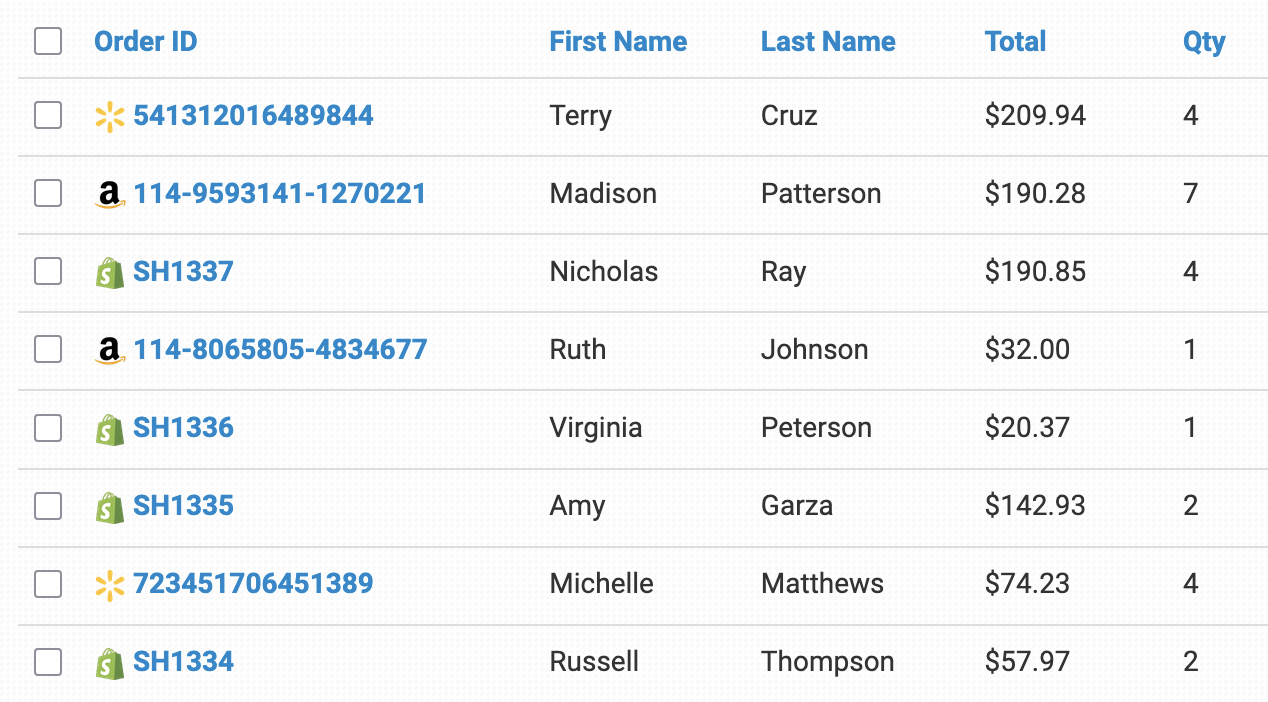
Every order from every channel, in one list
Orders from Shopify, Amazon, eBay, Walmart, TikTok Shop, and more land in custom folders you control. Split orders by vendor, send each part to the right partner, and push tracking back to the store the order came from.

Automation you set up yourself
Use the Rule Builder to split orders, add data before they’re sent for fulfillment, filter by country, and route every item to the right vendor.

Pricing that grows with your orders
Pay a flat monthly price and a small fee per order. Every plan includes all integrations, and Pro and Plus include unlimited users, so you never pay per seat.

Help from people who know orders
Follow step-by-step guided walkthroughs in the knowledge base, or reach a support team customers rate 5 stars when you’d rather talk it through.
How each one sends orders to suppliers
Order Desk routes orders with a few rules you set once. Odoo builds dropshipping into every product and every purchase order.
With Order Desk
- Orders flow in automatically from every store you sell on.
- Rules split each order by vendor, with tax, shipping, and discounts divided for you.
- Each vendor gets their part automatically, by integration, email, or CSV.
- Tracking flows back to your store and your customer.
Set up once.
With Odoo
- Switch on dropshipping in the Purchase app settings.
- Add a Dropship route, a vendor, and a price to every product you dropship.
- Each sale creates a request for quotation that someone confirms as a purchase order.
- Validate the delivery once the customer has their order.
Repeated for every product and every sale.

“Order Desk automated what we were already doing.”Sandy Higgins, owner of The Crackerjack Shack
Marker boards, sticky notes, and spreadsheets gave way to one central hub every employee can see.
Get your orders moving
Connect your stores and suppliers and watch orders route themselves. Start automating your orders today.
 Watch the Order Desk demo