If your ecommerce sales have dropped, you’ve probably got a few ideas about how to get them moving again. And possibly a discount code ready to go.
I’d hold onto that for a minute.
Before you give up part of your margin, let’s see what’s happening in your store. You could have fewer people visiting, a delivery charge putting shoppers off, or a bestseller that’s been out of stock longer than you realized. Those all need a different fix.
Here are five ways to increase sales without lowering your prices, starting with a look at what’s changed.
First, find out why your ecommerce sales are down
Open your store’s reports and compare the last four full weeks with the four before that. Keep the report and settings the same. If sales dropped suddenly, the daily view can help you spot when it started.
Think about what was happening during those earlier weeks too. A sale, product launch, or popular post might have brought in more orders than usual. Last year’s figures can also help you spot a seasonal dip.
Then look at these numbers:
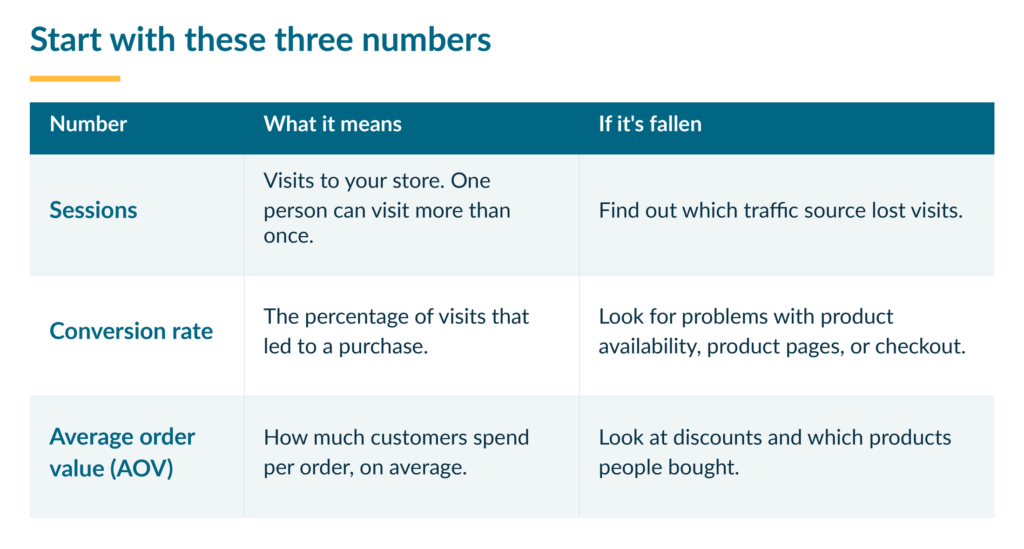
For example, if 20 out of 1,000 visits led to a purchase, your conversion rate would be 2%. More refunds or cancellations could also explain lower sales revenue, even if new orders haven’t slowed down.
If your ad dashboard shows a drop but your store has its usual orders, find out why the reports disagree before changing your ads.
Using Shopify? Its September 2026 reporting update changed how visits are counted. If you’re comparing dates across that update, look at orders and sales too. Your store might be doing fine even if the traffic figures look different.
1. Bring back traffic from sources that led to sales
Your traffic report can show whether fewer visitors are coming from Google, paid ads, email, or social media. Start with the source where visits dropped, especially if it used to bring in orders.
Did a campaign end? Have you sent fewer emails? Did last month’s popular video stop bringing people in? That gives you somewhere useful to start.
If email brought in sales and you haven’t sent one in a while, feature a popular product with a useful tip or a reason to use it. A picnic blanket packed for a beach day gives people more to picture than another photo of it folded on a shelf.
For social media, build on something people already responded to. Say an Instagram video showing what fits inside your bag brought shoppers over. Try another showing it packed for a day at work. Link straight to the bag so people can easily shop it, and open the link yourself before sharing it.
If Google traffic fell, Search Console’s Performance report can show which pages and searches lost clicks. Start with the affected pages. Update outdated information, repair broken links, or point shoppers toward available alternatives if featured products have sold out.
Watch orders alongside visits. More traffic is useful when you’re reaching people who want what you sell.
2. Make your product pages easier to buy from
Start with your bestsellers. Are they available in the sizes and colors people usually buy? If something’s sold out, find out when you can restock it. In the meantime, suggest an available alternative where it makes sense.
If stock isn’t the problem, open a product page that’s getting visits but fewer purchases.
If I’m buying a laptop bag online, I want to know whether it has padding and room for my charger. Your shoppers have their own questions. Is the mug dishwasher-safe? Does the print come framed?
A useful product page answers those questions without making people hunt for the details. Look for anything missing:
- Photos that clearly show the size and details
- A description of what’s included
- Size and color options that are easy to choose
- Delivery costs, timing, and returns information
- Genuine customer reviews or photos, if you have them
Your inbox can help here. If three people have asked whether the print comes framed, put the answer on the page.
Photos can do some of that work too. Show the laptop and charger inside the bag, or the print beside familiar objects so its size is clear. Our product photography guide has examples from Order Desk customers if you need ideas.
Pick one page to improve first. The rest of the catalog can wait.
3. Remove the problems stopping shoppers at checkout
You spend a lot of time running your store, but when did you last try shopping in it?
Follow a link from an email, ad, or social post and add a product to your cart. Go through checkout on your phone too. A button that’s easy to click on a laptop might be a pain to tap on a small screen.
Look for anything that gets in the way:
- Product options or buttons that don’t work
- No delivery available for an address you normally serve
- Shipping charges that only appear at the last step
- Payment errors
Before completing a purchase, follow your platform’s testing instructions and prevent the test order from being sent to a supplier. Shopify’s test-order guide explains the options. Payment test mode stops live purchases through that provider, so plan the test and turn it off when you’re finished.
If something goes wrong, save the error message and note what you clicked. That gives whoever fixes it something useful to work with.
Look at the final price too. A $25 product becoming $42 with delivery might explain why someone leaves. Show shipping costs or a delivery estimate earlier so shoppers know what to expect.
Fix anything you find, then repeat the purchase process. If your email platform supports abandoned checkout reminders, you can also send eligible shoppers a link back to their cart. A helpful reminder doesn’t need a discount attached.
4. Increase average order value with cross-sells
Someone choosing a notebook might like a matching pen. Someone buying a print might want a second one for the same wall. Suggesting a related item is called cross-selling, and it can increase sales from the orders you’re already getting.
Look at what people often buy together. Then show those items on the relevant product page or suggest them when someone adds a product to their cart. You could also offer them together as a bundle at their usual combined price, making it easier to buy the set.
Keep the suggestion relevant. If I’m buying a notebook, I might want the fluffy pink pen to go with it. That random mug you’ve been trying to sell is a harder pitch.
This can increase your average order value. With 20 orders, moving the average from $30 to $35 would add $100 in product sales.
Make sure the extra items are available, and tell shoppers if they’ll arrive separately. Then follow the results: are people adding them, and are you keeping more money after product costs, fees, and shipping?
5. Win back repeat customers
If fewer customers are returning, think about what would make another purchase useful to them.
Someone who ordered coffee might appreciate a reminder to stock up. Someone who bought a framed print might want to see your new collection. Give them something to look at beyond “we miss you.”
Start with one group of customers and an email that fits what they bought. Feature the relevant product or collection, explain why they might like it, and link straight to it.
Read recent customer messages before sending anything. If someone’s still waiting for a parcel or a reply, sort that out first. Our customer support guide has advice for those conversations.
Pick one thing to try first
You’ve probably spotted a few things you could change. I’d start with the one that seems most likely to explain the drop in sales.
Make a note of what you changed and the date. If you fixed a checkout problem, test it again and watch how many checkouts turn into orders afterward. That’s your conversion rate.
Give other changes some time. If you get a handful of orders each week, tomorrow’s numbers won’t tell you much. Keep an eye on anything else that could affect sales too, like an email campaign or a product selling out.
And if you decide to run a discount, you’ll have a clearer reason for it than “sales are down, let’s try a code.”