Shopify merchants made $14.6 billion in sales over Black Friday Cyber Monday (BFCM) in 2025, up 27% from 2024.
If you’re hoping for a busy Black Friday this year, this holiday ecommerce checklist starts with your suppliers. Before putting your bestselling T-shirt on sale, find out how many your printer can produce and when they can ship them. You’ll also want to confirm how much you’ll keep from each sale after the discount and other costs.
We’ve put together this holiday ecommerce checklist with advice from Printbelle and WorldFirst. It covers what to prepare before your promotions go live and what you’ll need for the December orders that follow, including your last order dates for holiday delivery.
What should you do before your promotions go live?
Start with your promotion calendar, and give your suppliers time to check the plan before you announce anything.
1. Plan your promotions through December
Open your calendar and plan beyond Cyber Monday. Which offers will end that night? What will customers see when they visit your store the next morning? You could keep an offer running into December if your stock and margins allow, or replace it with a gift guide.
Put each update in the calendar with a start date, end date, and the person making the change. Include a reminder to remove old banners. It’s surprisingly easy to still be advertising Black Friday halfway through December.
2. Use your sales data to pick what to promote
Look through last year’s holiday orders, or your recent sales if this is your first season. Check what sold well, what ran out, and what customers returned. If a product kept shipping late, find out why before sending more orders through the same supplier.
Then look at what you’d earn at the sale price after production costs, shipping, and payment fees. A 20% discount can take a much bigger bite out of your profit than you expect.
You don’t have to give your bestselling product the biggest discount. If you hold stock, consider using a larger offer to move slower-selling items, provided there’s still enough profit left to make it worthwhile.
3. Build a shared plan with your suppliers
Before you announce the sale, send your suppliers one shared document with the details they need:
- Products, variants, and bundles included
- Discounts, free gifts, and shipping offers
- Start and end dates, including the time zone
- Expected order numbers, clearly marked as estimates
- Who’s handling each task and who to contact with questions
If you’re offering a free mug with every T-shirt, agree on how qualifying orders will be identified and who will send the mug. Ask suppliers to confirm what they can support and flag any stock or production limits before you launch.
Schedule your banners, discounts, and product updates in advance where your platform supports it. Preview them together, check the time zone settings, and test the offer at checkout. The discount in your email should be the one your customer gets.
How do you get order management ready for BFCM?
Think about the orders you still have to help along by hand. If you’re copying addresses or adding artwork to each order, now’s the time to review that process.
4. Ensure each product has what its supplier needs
Start with the products in your promotions, especially new items and bundles. Check that orders include the right product codes, sizes, colors, and any artwork or personalization your supplier needs.
Your store’s SKU and your printer’s product code may be different. Make sure the order sends the code your printer expects, along with an artwork link they can open. Our print on demand fulfillment guide explains how to set this up in Order Desk.
5. Test your split orders and your failed-order process
If a customer buys a T-shirt and a mug from different suppliers, make sure each supplier receives the right details. With the relevant integrations and rules configured, Order Desk can split the order and send each part to its fulfillment provider.
Before the sale, look at:
- Your store and fulfillment connections are working
- Rules cover any new products, bundles, or free gifts
- Split orders reach the right suppliers
- Shipment updates return to the systems that need them
- Someone is responsible for checking orders that fail to submit
Supported features vary, so compare the guide for each integration you use.
If an order fails, read the full error and look at the Order History before sending it again. Confirm whether your supplier already has it, especially if the error mentions a timeout or duplicate. Our failed-order guide walks you through what to test.
How do you confirm production capacity and holiday shipping deadlines?
6. Get production and shipping times for each destination
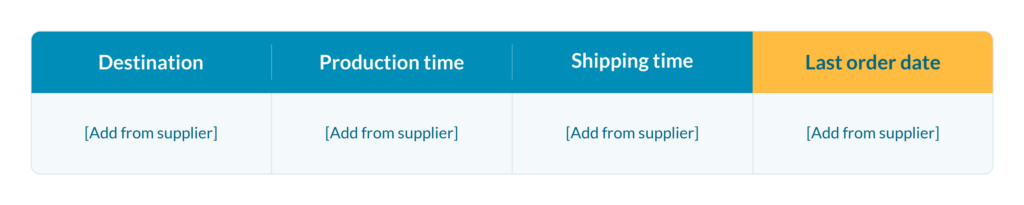
Keep production time and shipping time separate. Production tells you when an order leaves, and shipping tells you when it arrives. Ask every supplier for their last order dates and whether they close or slow down over the holidays, then put the answers in one table your team can find.
Our friends at Printbelle recommend getting a head start on peak season preparations. Test your products, designs, and marketing campaigns early so you can focus on what’s already working when orders start picking up.
It’s also worth checking in regularly with your fulfillment partner, especially about their capacity to handle your bestselling products. A good supplier can help you spot new trends and popular products based on what they’re seeing in their own sales data.
And if delays or production issues come up (because they do!), communication matters. You want a supplier who tells you about potential problems early, gives you realistic delivery estimates, and helps find solutions. That way, you can keep your customers informed and avoid unnecessary headaches during your busiest season.
7. Give customers realistic delivery dates
Put your holiday shipping deadlines on product pages, at checkout, in your FAQ, and in order emails. And make it clear if items will arrive in separate parcels.
If you sell to US customers, review the FTC’s shipping requirements. You need a reasonable basis for the shipping time you advertise, or generally for shipping within 30 days if you give no timeframe. If you can’t meet the deadline, follow the required process for notifying customers and obtaining consent to a delay or issuing a refund.
Look at your gift options while you’re updating the store. If you offer gift messages or delivery to another address, test that those details reach your supplier. Set your holiday return dates now and publish them wherever customers look for your return policy.
How do you plan supplier payments and cash flow?
8. Match your payouts to your supplier bills
Check when the money from your sales will reach your account and when your suppliers expect payment. If production bills are due on Monday but your payout only arrives on Thursday, you’ll need enough cash to cover those few days.
Put those dates on a timeline. Factor in bank holidays, transfer times, currency conversion fees, and leave some room for refunds or unexpected costs.
WorldFirst suggests keeping a close eye on international payment costs, especially if you’re selling in different currencies. Exchange rates and transaction fees might seem small on their own, but they can add up quickly when you’re processing hundreds of orders.
For example, WorldFirst lets sellers receive, hold, and send money in over 20 currencies, so you’re not constantly converting funds between currencies. You can also pay suppliers in more than 100 currencies across 210+ regions, with 80% of transfers arriving on the same day.
The main thing is to know when money is coming in, when it’s going out, and how much you’re losing to fees along the way.
How do you test your store before BFCM?
9. Browse your store on mobile
Smartphones accounted for 56.4% of US online shopping transactions during the 2025 holiday season, according to Adobe Analytics.
Open your store on your phone and buy one of the products you’re promoting. Can you select the right size, apply the discount, and find the delivery information without hunting for it? Confirm the shipping options and final total, including any bundle or free gift.
Run your main pages through PageSpeed Insights to check for loading issues. Ask your website manager to confirm it can handle your expected traffic.
10. Run a test order from checkout to fulfillment
Choose a few orders that show what you will sell. Include a bestseller order. Add an order split between suppliers. If you offer them, include a personalized item or bundle. Agree on any live tests with your fulfillment partners first, so you know what will be produced and charged.
Follow each order and check:
- The right discount, products, and shipping option appeared at checkout
- The order reaches your order management system with the required details
- Each supplier receives the right items and can process them
- Shipment updates reach your store, and the customer notifications are correct
Write down anything you had to fix by hand. Assign someone to resolve it, then repeat that test before the sale starts.
What should you do after BFCM?
Keep checking for failed orders and supplier delays while December orders come in. Assign someone to update your website and handle customer questions as your last order dates approach. If a supplier changes an estimate, update affected customers as well as the information on your site.
Once the rush and holiday returns have settled, review what sold, what came back, and which orders needed extra work. Save those notes with your promotion calendar so you have them when you plan next year’s sale.
Holiday ecommerce checklist FAQ
What is BFCM?
BFCM stands for Black Friday Cyber Monday, the sales weekend after US Thanksgiving. Stores often run promotions before and after the weekend, too.
When should you start preparing your ecommerce store for BFCM?
Start early enough for suppliers to review your promotions and confirm capacity. If you’re already a few weeks away, contact them first. Your offers and delivery promises depend on their answers.
What should be on a holiday ecommerce checklist?
Include your promotion calendar, product and order checks, supplier capacity, shipping deadlines, payment dates, and store testing. Give each task a deadline and someone responsible for it.
What are the last order dates for holiday shipping?
There’s no single cutoff. Dates vary by product, supplier, destination, and shipping service. Use the deadline for the specific order rather than copying a carrier’s cutoff, which may leave out production time.
How do you test your store before Black Friday?
Buy one of your promoted products on your phone, then follow that order through to your supplier. Write down anything you had to fix by hand and repeat the test once it’s sorted.
When should you set your holiday shipping deadlines?
Confirm them with suppliers before publishing your holiday offers. Allow for production, shipping, and possible delays, then review the dates if your suppliers’ estimates change.